
Security awareness training, built as evidence.
Security awareness training software is a learning management system that assigns, tracks, and certifies staff training. grComply's training module goes further: every course, quiz, and phishing-simulation result rolls into the same computed completion percentage as your framework controls — so training isn't a side activity your auditor has to take on faith. Campaigns by team, coverage tracked against a 95% target, certificates, team leaderboards and phishing simulation with team-level results — on add-on training seats for the Professional, Enterprise Cloud and Enterprise plans, and included on Enterprise Assured.
What is security awareness training software? It's an LMS purpose-built for compliance and security topics — phishing recognition, data-handling, incident response — that assigns courses to staff, tracks completion, and issues certificates. grComply's training module is the same idea with one structural difference: every course carries a mandatory purpose and a compliance-framework mapping before it can ever publish, checked server-side, not as an optional field someone forgets to fill in.
Training that answers to your compliance programme
Every course answers "why" and "which compliance"
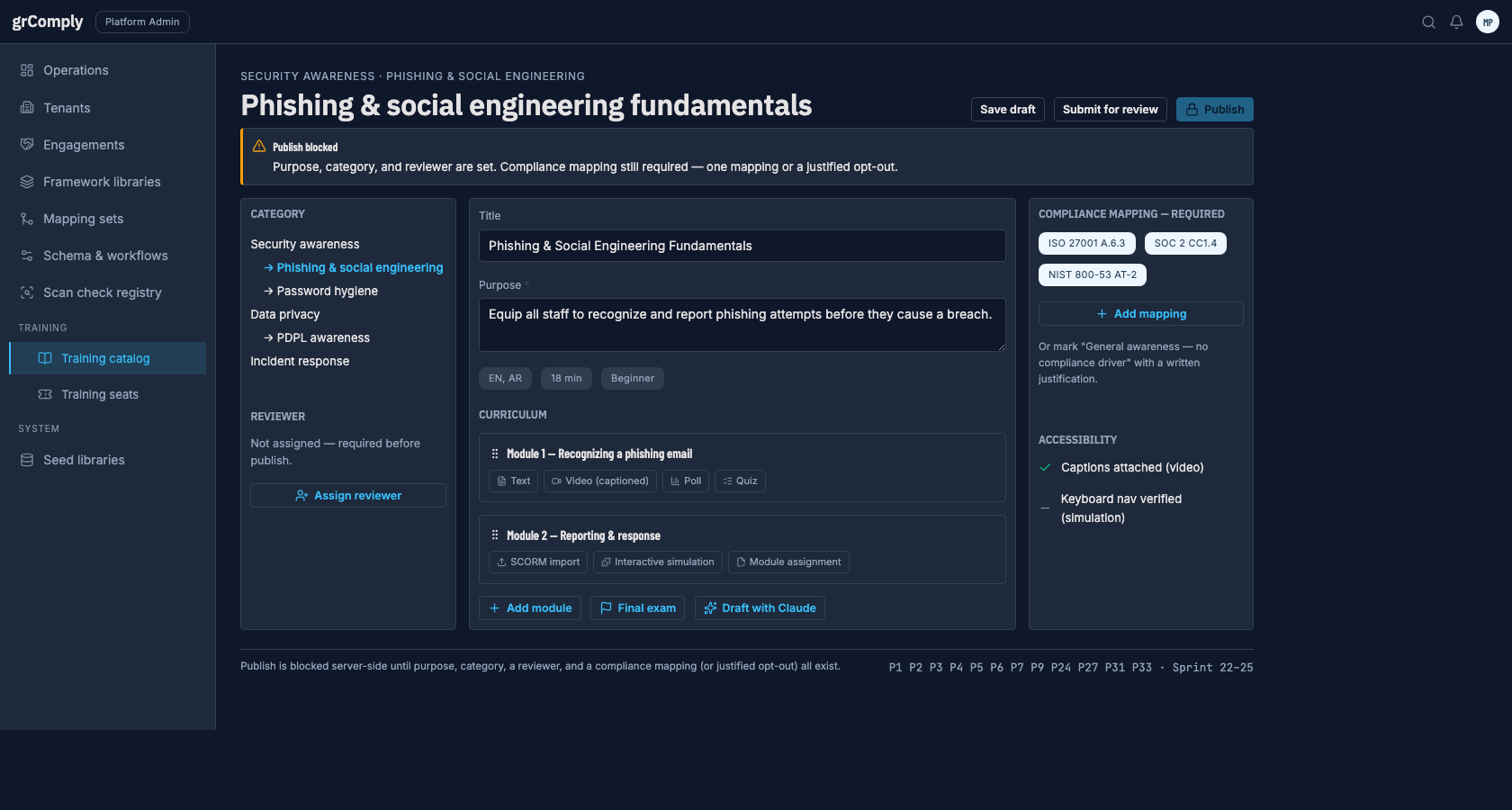
A stated purpose and at least one compliance-framework mapping (or an explicit, justified general-awareness opt-out) are hard-gated at publish — carried onto every certificate and evidence item the course produces, so an auditor never has to ask what a training exists to satisfy.
A real curriculum, not a flat file
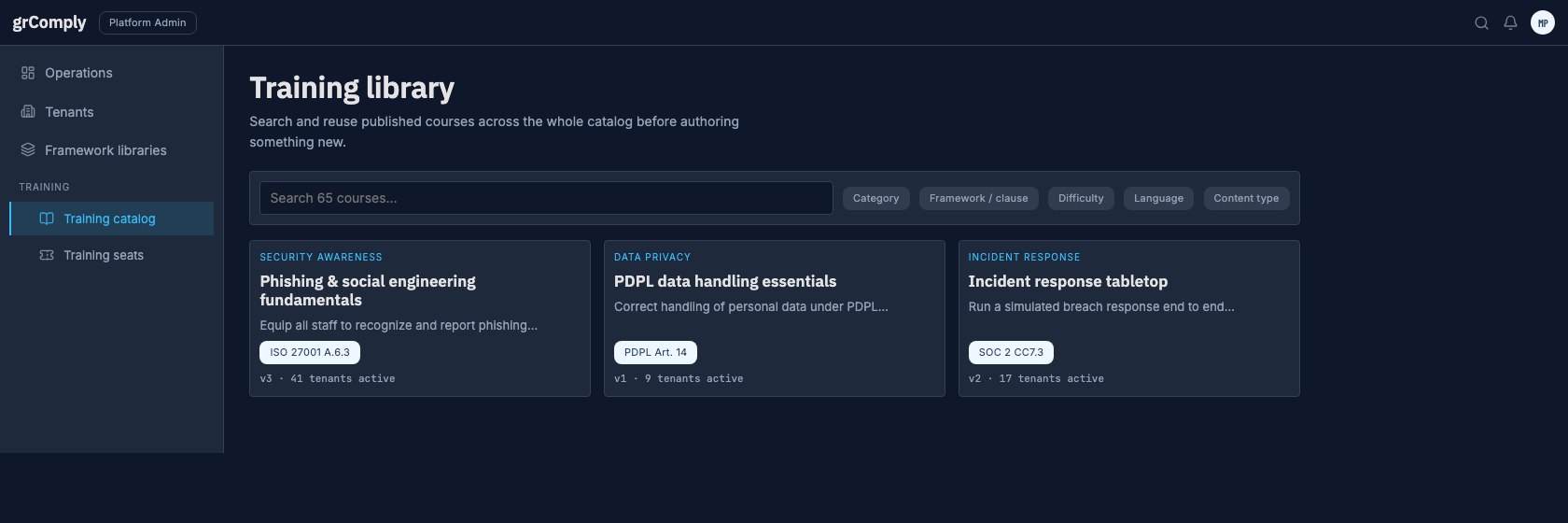
Category ▸ Course ▸ Module ▸ Content Block, arbitrary depth — the same tree pattern grComply already uses for framework controls. A course can be one five-minute video or a multi-module curriculum with a cumulative final exam.
Nine content types, all data
Text, captioned video, read-and-acknowledge documents, interactive simulations, puzzles/games, polls, in-lecture quizzes, module assignments, and imported SCORM/xAPI packages — extensible the same way custom fields are, without a deployment.
Completion is evidence
A finished TrainingAssignment is generated the same way as an uploaded document or a scan finding, and rolls into the same computed completion percentage as every other control — one readiness number, not two systems to reconcile.
Automated phishing simulation
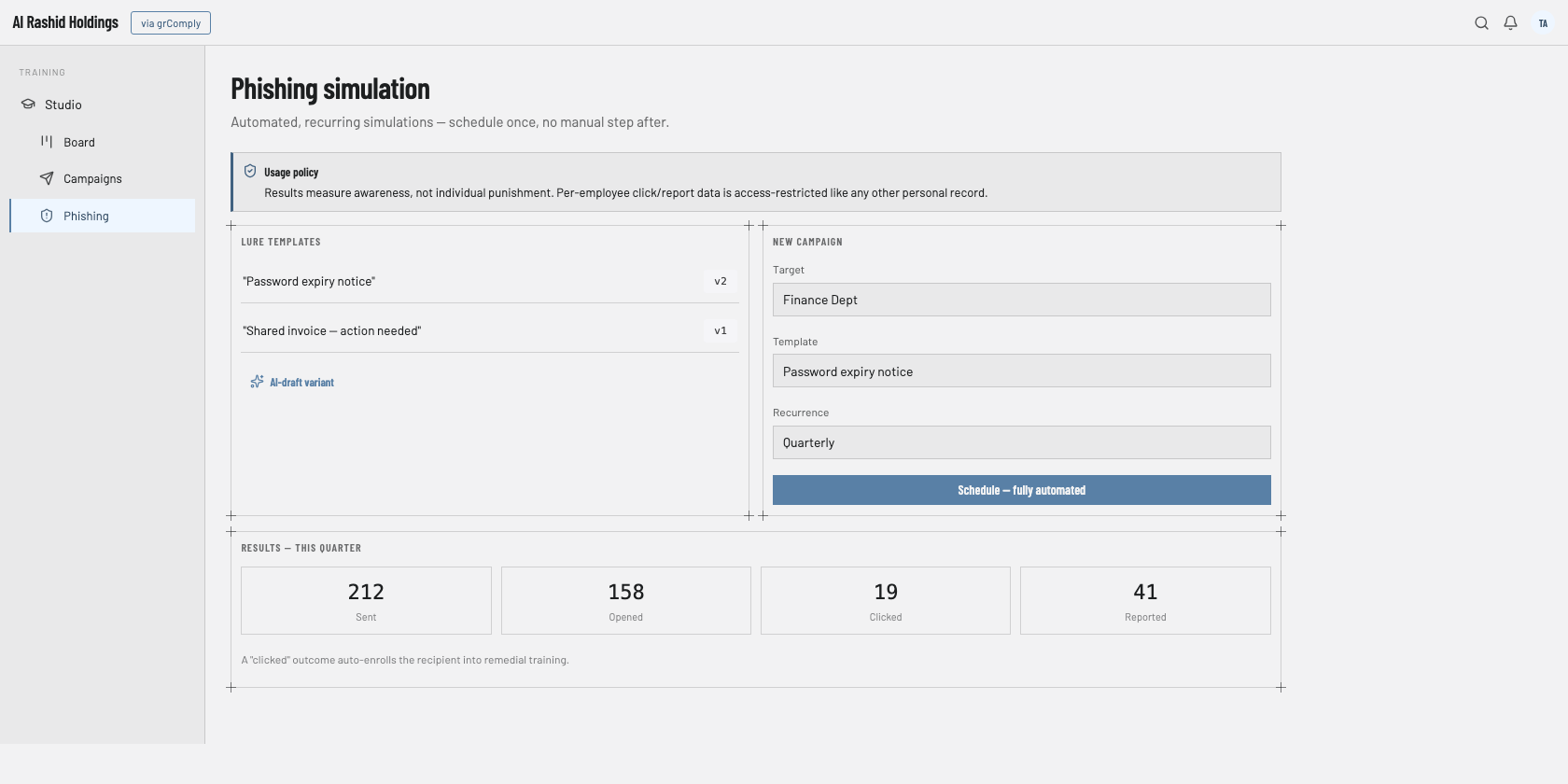
Schedule once from a versioned lure template — send, open, click, and report are tracked per recipient with no manual step after. A click auto-enrols the recipient into remedial training, bounded by an explicit non-punitive usage policy.
Seat-based, decoupled from your platform licence
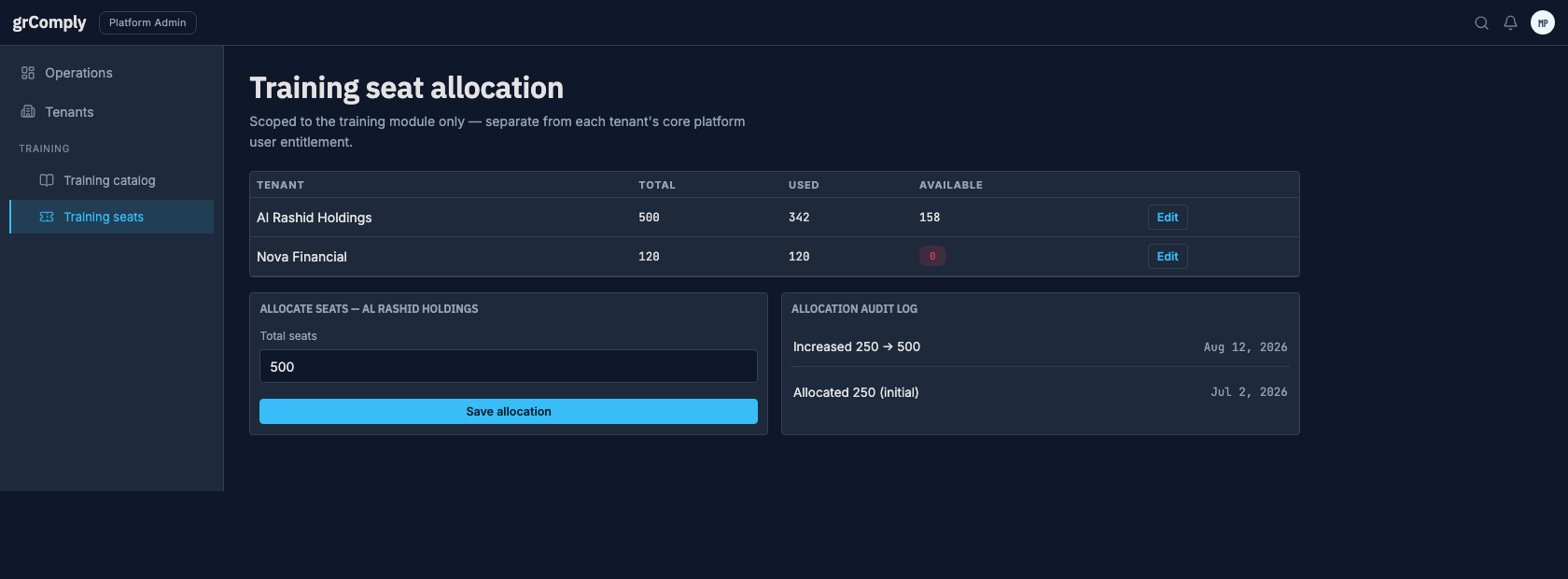
A training-only seat pool is allocated per tenant, separate from the core GRC user entitlement — so a whole workforce can take awareness training without buying GRC seats for people who only need My Learning.
Every stage of the training lifecycle, built in
Course authoring and the publish gate
A Content Creator (Mutex-side, or a tenant's own delegated author) builds curricula in a dedicated studio: title, purpose, category, curriculum modules, and a compliance-mapping panel. Publish stays locked until a reviewer distinct from the author is assigned, a compliance mapping (or justified opt-out) exists, and video/interactive blocks pass an accessibility check — captions attached, keyboard and screen-reader operability verified. An AI assistant can draft lecture text or quiz questions from source material already in the platform, always labelled AI-generated and requiring human approval before publish.
Built for: Platform Admin, delegated Content CreatorTenant catalog and custom courses
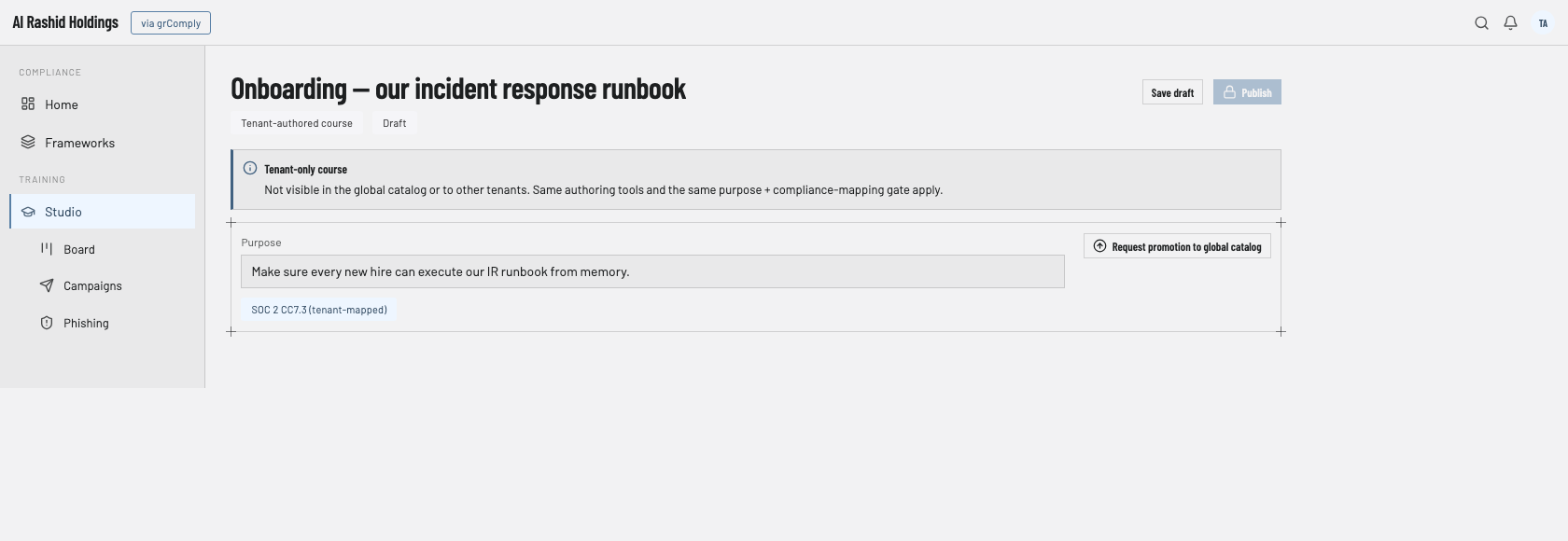
A Tenant Admin activates only the published courses relevant to their organisation from the global catalog — mirroring how framework assignment already works elsewhere in grComply. A tenant can also author its own internal-only course (an onboarding runbook, a company-specific incident drill) with the same tools and the same publish gate, kept private to that tenant unless a Platform Admin later promotes it to the global library.
Built for: Tenant AdminTeams, campaigns and recurring refreshers
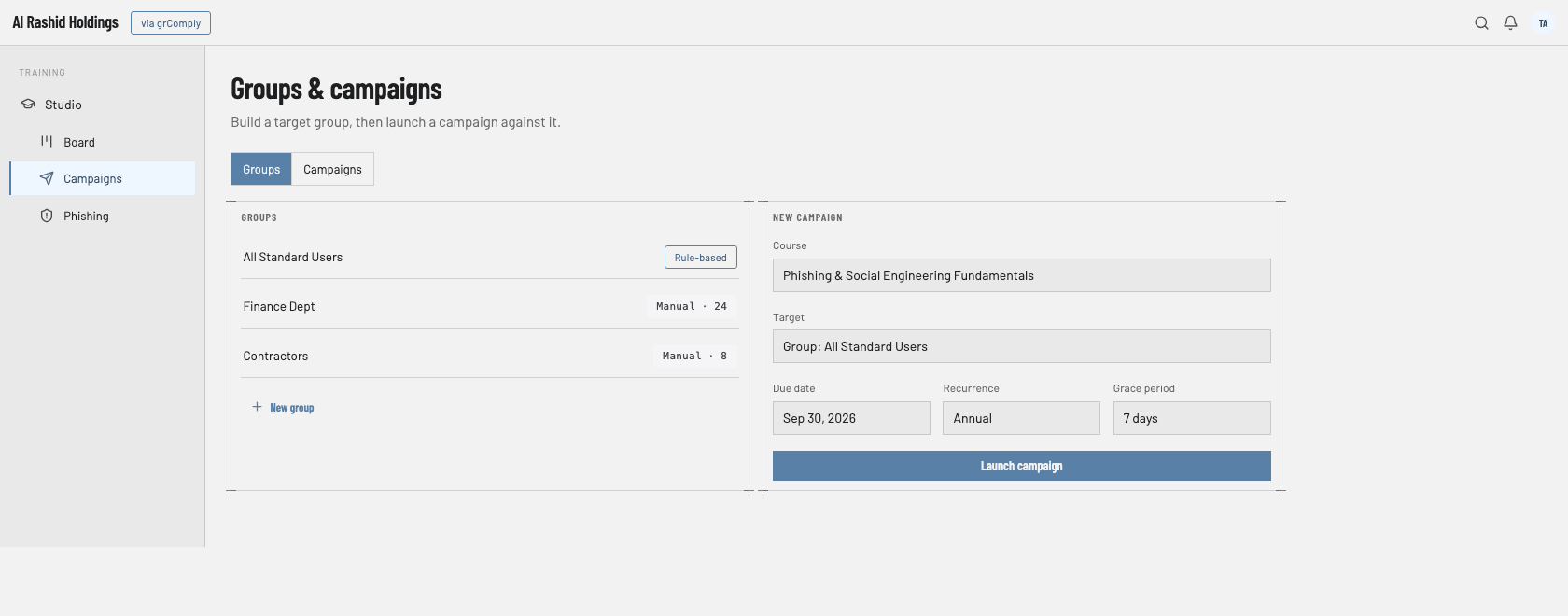
Training groups act as teams — built by individual, department rule or role. Launch a named campaign for one or more teams with a course, due date, grace period and recurrence; each campaign shows whether it is running, closing soon, past due or closed, and one click reminds only the people who are behind. Recurrence follows a course's validity period, so annual-awareness requirements under ISO 27001, SOC 2, PCI DSS, SAMA CSF or NIST never need manual re-assignment.
Built for: Tenant AdminAwareness overview and the People view
One overview answers "are we covered?": workforce coverage against a 95% target, what is pulling coverage down, people past their grace period by team, certificates about to expire, the controls training is evidencing, and a short list of what needs attention. The People view lists everyone by team and state — not started, in progress, completed, overdue or exempt — with reminders, exemptions and a drill-in to each person's record.
Built for: Tenant Admin, Compliance Officer, leadershipMy learning, the course player and team leaderboards
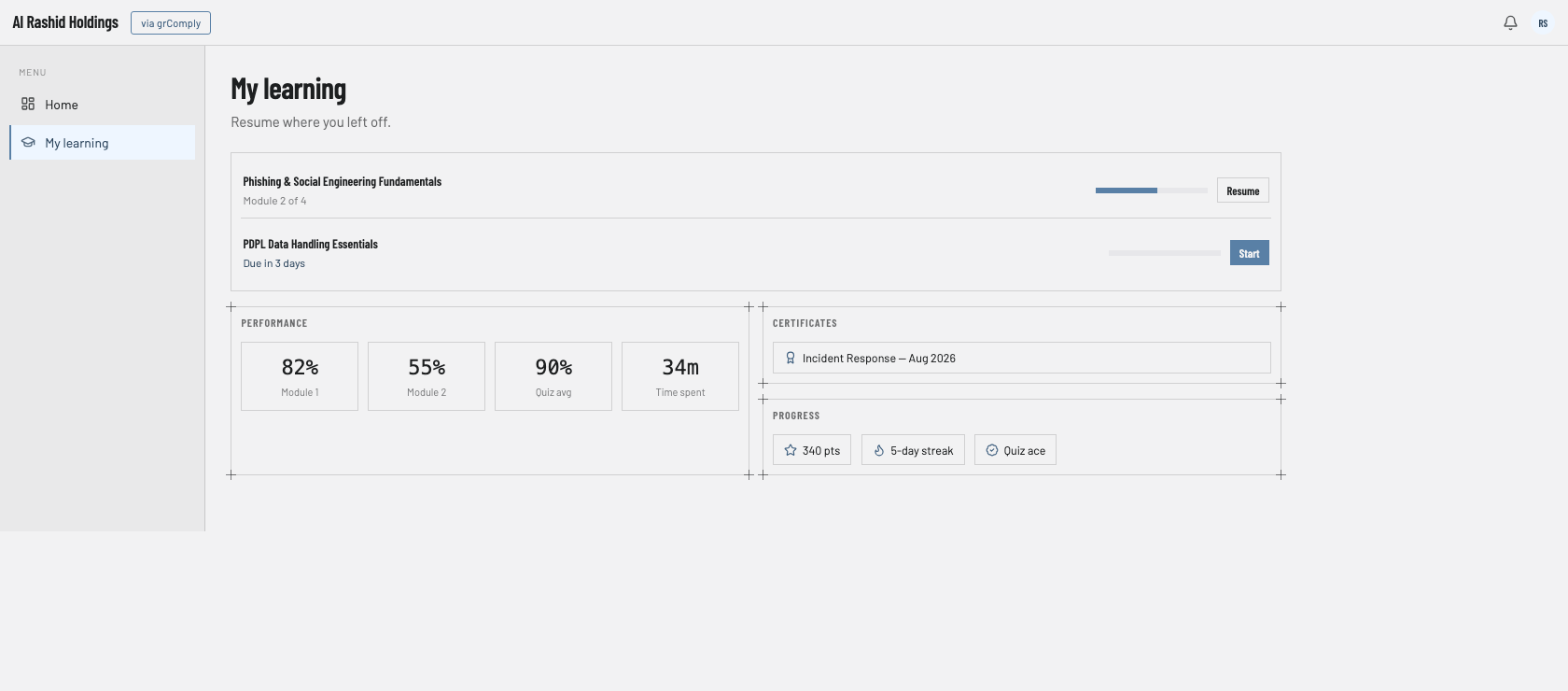
Each learner sees their assignments, due dates and certificates in My learning, with their team's standing on a team leaderboard and points for completed courses. The course player resumes where they left off, shows progress and minutes left, asks quick-check questions before moving on, and issues the final test from the server so every learner is graded on exactly the paper they saw.
Built for: every learnerAutomated phishing simulation
Versioned lure templates (subject, sender, body, landing page — optionally AI-drafted and human-approved) drive a scheduled, recurring campaign that runs end-to-end with no manual step once configured. Every lure explains its warning signs, so the simulation teaches as it tests. Results are shown by team — sent, opened, clicked and reported, with report rate tracked against a target and a resilience trend over time — and teams smaller than five people are grouped so no individual can be singled out. Repeat clickers are flagged for follow-up and a click enrols the person in remedial training. Individual results are visible only to workspace administrators, who must record a reason that is kept in the audit trail. Usage is bounded by an explicit non-punitive, privacy-scoped policy.
Built for: Tenant AdminCertificates and legacy import
A printable certificate is issued on passing the final test — client-branded, naming the framework controls the course satisfies, and valid for the course's validity period in calendar months. Historical completion records from a client's previous LMS or a spreadsheet import as clearly flagged legacy evidence, so adopting grComply's training module doesn't reset an already-compliant workforce's awareness posture to zero.
Built for: Tenant Admin, Platform AdminWhich grComply plans include awareness training
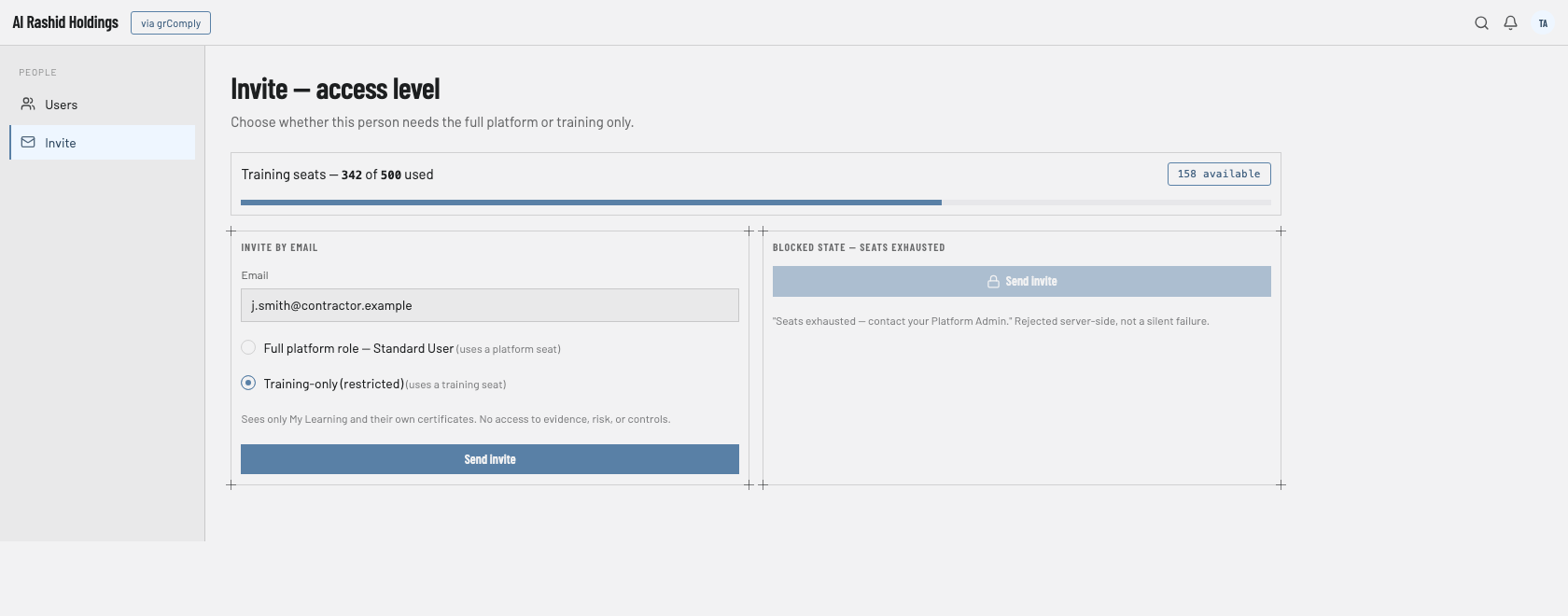
Training seats are separate from platform users, so the whole workforce can learn without platform licences.
Two access levels, one seat pool
Awareness training usually needs to reach a whole workforce — not just the handful of people who use the rest of a GRC platform. grComply licenses the training module separately for exactly that reason.
Restricted by design
Sees only My Learning and their own certificates and performance — no evidence, risk, or control data, enforced server-side. Consumes one training seat.
Standard User, Compliance Officer, etc.
Draws from the tenant's core platform user entitlement instead — completely unaffected by the training-seat pool, and vice versa.
Sized for the whole workforce
A Platform Admin allocates each tenant a training-seat pool, visible live to the Tenant Admin. Invites past the pool are rejected server-side, and a seat releases automatically the moment its user is deactivated.
Four roles, one training programme
Training screens from the grComply workspace
From course authoring through to a learner's own certificates — the same workspace shown at every stage of the training lifecycle.
Standalone awareness tools vs. a compliance-mapped module
| Approach | Typical tools | What you get |
|---|---|---|
| Standalone awareness training | KnowBe4, Proofpoint Security Awareness, Hoxhunt, Curricula | Course library and phishing simulation as a separate contract — completion evidence exported and manually re-attached to your GRC or audit tooling. |
| grComply training module | Built into grComply — add-on training seats on Professional, Enterprise Cloud and Enterprise; included on Enterprise Assured | Courses mapped to the exact control they satisfy; completion rolls into the same compliance percentage automatically — no export, no manual re-attachment. |
grComply's wedge: teams that don't want a training completion spreadsheet sitting next to their GRC evidence — the training module reports into the same control tree, the same completion cache, and the same audit export as everything else.
Security awareness training in grComply
What is security awareness training software?
Security awareness training software is a learning management system (LMS) that assigns, delivers, and tracks staff training on security and compliance topics — phishing recognition, data-handling, incident response — and produces a completion record auditors and regulators can check. grComply's version also maps every course to the specific control it satisfies.
Does training completion count as compliance evidence?
Yes. A finished assignment is generated the same way as an uploaded evidence document or a scan finding, and rolls into the same computed completion percentage as every other control — so training posture shows up alongside everything else, not in a separate spreadsheet.
What content types can a course include?
Text, captioned video, read-and-acknowledge documents, interactive simulations, puzzles/games, polls, in-lecture quizzes, module assignments, a cumulative final exam, and imported SCORM/xAPI packages — all normalized into the same progress and scoring model.
How does the phishing simulation work?
A Tenant Admin schedules a recurring campaign from a versioned lure template whose warning signs are explained to the recipient. Sent, opened, clicked and reported are tracked and reported by team; a click enrols the person in remedial training, under an explicit non-punitive usage policy.
Can we import our existing SCORM or xAPI courses?
Yes. Existing packages import as a content block alongside natively authored ones, and historical completion records from a previous LMS or spreadsheet import as clearly flagged legacy evidence — adopting grComply doesn't reset an already-compliant workforce to zero.
What is a training-only seat?
A restricted account that sees only My Learning and its own certificates and performance — no evidence, risk, or control data — drawing from a separate training-seat pool a Platform Admin allocates per tenant, independent of your core platform user entitlement.
How often does refresher training need to run?
Whatever cadence your framework requires — set a course's validity period once and grComply auto-generates a new campaign per learner before certificate expiry, matching annual-awareness requirements under ISO 27001, SOC 2, PCI DSS, SAMA CSF, or NIST.
Which grComply plans include security awareness training?
Awareness training is available as add-on training seats on the Professional, Enterprise Cloud and Enterprise plans, and is included up to your size band on Enterprise Assured, together with an awareness roll-out. It is not part of the Starter plan. Training seats are separate from platform users.
How do I know whether the workforce is covered?
The awareness overview shows coverage against a 95% target, what is pulling coverage down, people past their grace period by team, certificates about to expire and the controls training is evidencing. Leadership sees the same coverage on the executive overview, with its trend over time.
Can people see phishing results for individual colleagues?
No. Phishing results are reported by team, and teams of fewer than five people are grouped so no one can be singled out. Only workspace administrators can open individual results, and they must record a reason, which is kept in the audit trail.
Can a tenant build its own internal-only course?
Yes. A Tenant Admin or delegated Content Creator can author a custom course with the same authoring tools and the same publish gate as the global catalog. See which plans include training on the grComply plans page.
See training completion become compliance evidence
Powered by Mutex Systems. Back to grComply overview → · grComply pricing → · grComply vs GRC platforms →
Talk to us about training seats
Tell us the size of your workforce and which frameworks your training needs to map to, and we'll route it to the right product specialist.
- A product specialist replies personally — not a bot
- No obligation after the first conversation
- WhatsApp support also available 24/7
By submitting, you agree to be contacted about your enquiry. We respect your privacy.
Book a meeting directly
Pick a time that works for you — 30 minutes with a product specialist, no sales script.
Ready to roll out training your auditor will trust?
We respond within one working day — or reach us instantly on WhatsApp.